DoorDash customer service is available at 1-855-431-0459. DoorDash says consumer phone and chat support are available 24 hours a day, seven days a week. For a missing, wrong, late or undelivered order, the fastest starting point is usually the affected order in the DoorDash app: open Orders, select the order, tap Help and choose the exact problem.
- Customers and Dashers: 1-855-431-0459 — phone and chat support are listed as available 24/7
- Dasher app or missing-earnings problem: Read the outage guidance before resetting or reinstalling
- Merchants with a live order: 1-855-222-8111
- DoorDash for Business: 1-855-830-5429 or business-support@doordash.com
- DoorDash Crimson account or card: 1-855-973-1040 — not the general consumer number
Contact information and support routes reviewed August 30, 2026. Customer and Dasher 24/7 support, outage guidance and report context checked October 7, 2026.
- DoorDash phone numbers and official support
- Missing, wrong, late and canceled orders
- Refunds and DoorDash credits
- DashPass cancellation and billing
- Duplicate or unfamiliar DoorDash charges
- Dasher outage, missing earnings and sign-in help
- Dasher, merchant and Business support
- DoorDash complaints and escalation
- Frequently asked questions
DoorDash Customer Service Phone Numbers and Support
| Who needs help? | Best contact | Use it for |
|---|---|---|
| DoorDash customer | 1-855-431-0459 Customer Help Center |
Current and past orders, refunds, credits, DashPass, payments and account access |
| Dasher | 1-855-431-0459 Dasher Help Center |
Active deliveries, app access, pay, ratings, account and safety issues |
| Restaurant or merchant | 1-855-222-8111 Merchant Help Center |
Live U.S. order issues; use the Merchant Portal for non-live account, menu or payout matters |
| DoorDash for Business | 1-855-830-5429 business-support@doordash.com |
Corporate meal programs, employee DashPass, billing and business-account help; 5 a.m.–9 p.m. Pacific time daily |
| DoorDash Crimson | 1-855-973-1040 | Crimson deposit-account or card questions, including a card that did not arrive |
| Corporate office | 1-650-487-3970 | Headquarters and corporate matters; not presented as a consumer refund line |
Headquarters: DoorDash, Inc., 303 2nd Street, South Tower, 8th Floor, San Francisco, CA 94107
Missing, Wrong, Late or Canceled DoorDash Orders
Order-specific support can see the restaurant or store, delivery status, delivery photo, payment and prior contacts. Begin with the affected order instead of opening a general account request.
Order never arrived or was delivered to the wrong address
- Open DoorDash and select the affected order from Orders.
- Tap Help.
- Choose Order never arrived or the closest delivery issue.
- Follow the guided resolution or connect with an agent.
- Save the delivery photo, map, messages and support decision before they are difficult to retrieve.
Check the front door, side door, lobby, reception desk and nearby address shown in the delivery photo when it is safe to do so. Do not enter another person’s property or confront a Dasher. If the order may have been stolen or a safety issue occurred, document what happened and use DoorDash’s safety route.
Missing, incorrect, damaged or unsafe items
In the app, select the order, tap Help, choose Missing or incorrect items and follow the prompts. Photograph damaged packaging, broken seals, incorrect items or food-quality concerns before discarding anything that can safely be retained. DoorDash may offer a refund, credit, redelivery or review depending on the order and issue; a particular remedy is not guaranteed.
Late order or order cancellation
For a current order, use the in-app help route so support can see the live status. To request cancellation, select the order, tap Help and choose Cancel Order. The available refund can depend on whether the merchant accepted or prepared the order and whether a Dasher was assigned. If the restaurant is closed or a Dasher asks you to cancel, contact a live DoorDash agent rather than relying only on a message from the restaurant or driver.
DoorDash Refunds, Credits and Refund Status
A DoorDash resolution may appear as DoorDash credit or as a refund to the original payment method. Check which one the confirmation names before assuming the refund is missing.
- Open the order and report the exact issue through Help.
- Record the amount approved, whether it is a credit or card refund and the approval date.
- Check the DoorDash Payment Methods area for account credits.
- If a card refund has not appeared, ask DoorDash for written confirmation and the date it was processed.
- Allow for the bank or card issuer’s processing time, which can differ by payment method.
For a stronger refund request, keep the order number, receipt, delivery photo, item photos, chat transcript and screenshots of the promised resolution. If an approved card refund remains missing after the payment provider’s stated processing period, follow up with DoorDash under the same case and ask the card issuer to trace the refund.
How to Cancel DashPass and Handle a DashPass Charge
DashPass renews automatically until canceled. In the DoorDash app or on DoorDash.com, open the account menu, choose Manage DashPass, select Cancel Membership and complete the prompts. Keep the confirmation email or screenshot.
- Cancel at least one day before the scheduled renewal to avoid the next charge.
- Cancellation normally stops future renewals and takes effect at the end of the current paid period.
- DoorDash’s U.S. terms say subscription fees are generally nonrefundable, subject to stated exceptions and applicable law.
- After a free trial or promotional period, a cancellation within the first 48 hours of the first paid period may qualify for a full DashPass-fee refund.
- For a first monthly or annual subscription period without a DashPass-eligible order, DoorDash says a refund requested within 48 hours may be granted at its discretion.
If the charge continued after cancellation, contact 1-855-431-0459 or in-app support with the account email, charge date, amount, cancellation date, confirmation and last four digits of the payment card. Do not post those details in a public review.
Duplicate, Unauthorized or 303 2nd Street DoorDash Charges
A statement entry showing 303 2nd Street or San Francisco may be related to DoorDash, DashPass or Caviar because DoorDash has used that address for its headquarters. An address match alone does not prove that a transaction is legitimate or authorized.
- Compare the amount and date with DoorDash and Caviar order history.
- Review DashPass billing, canceled orders, tips, substitutions, credits and refunds.
- Search email receipts for DoorDash, DashPass, Caviar and the exact amount.
- Check PayPal, Venmo, Cash App, Apple Pay or Google Pay if a wallet is connected to the card.
- Ask other authorized card users whether they placed an order.
- If nobody recognizes the charge, contact DoorDash through an official route and notify the card issuer promptly.
For statement variations and a card-charge checklist, see the exact 303 2nd Street DoorDash charge guide on ChargeOnMyCard.com.
DoorDash Account, Payment, Promo Code and Gift Card Help
Use the Customer Help Center linked in the contact table or call 1-855-431-0459 for login, verification, locked-account, payment, promotion or gift-card issues. Calling from the phone number connected to the account may help with account verification.
- Login or verification: confirm the account email and phone number, request a new code and check spam or junk folders.
- Payment failed or wrong card charged: review every saved and backup payment method. DoorDash’s terms permit use of another eligible payment method on file if the preferred method fails.
- Promo code: save a screenshot of the offer and its expiration, minimum order, market and account-eligibility terms.
- Gift card: keep the purchase receipt and card number private; share it only through an official support route when requested.
DoorDash Safety and Fake Support Calls
DoorDash lists its 24/7 Trust and Safety team at 1-855-431-0459. Use the app’s safety prompts or phone support for a non-emergency incident tied to an order. If there is immediate danger, call 911 before contacting DoorDash.
- Do not share a password, security code, one-time login code, bank login or full card number with an unexpected caller.
- Do not use a support number from a sponsored ad, unsolicited text or social-media reply without confirming it on DoorDash’s official site.
- Dashers should end suspicious calls connected to small or canceled orders and start support from the Dasher app.
- If credentials were shared, change the password immediately and check payout, bank and Fast Pay information.
- For an unfamiliar order or account takeover, save the order details, change the password and contact DoorDash and the payment provider.
Dasher App Outage: Missing Earnings or Trouble Signing In
App crashes, sign-in failures, trouble starting or ending a Dash, or completed orders missing from Earnings can indicate an outage. DoorDash’s official Dasher outage instructions say:
- Keep refreshing the app and retrying sign-in.
- Do not reset your password during an outage.
- Do not uninstall and reinstall the app during an outage.
DoorDash says completed-order earnings should display correctly after resolution. Information about potential additional compensation or ratings adjustments comes through official email afterward; this does not guarantee compensation.
CSN documentation checklist: Save delivery IDs, completion times, error messages and screenshots of missing earnings. If an active delivery is affected, use Dasher in-app Help or call 1-855-431-0459; phone and chat are listed as available 24/7. If earnings remain incorrect after recovery, ask support to review the specific deliveries and retain the case number. An outage-related display problem and a bank or payout-account problem may require different follow-up.
DoorDash Dasher, Merchant and Business Support
Dasher support
Dashers can use the ? or Help button in the Dasher app, visit the Dasher Help Center linked in the contact table or call 1-855-431-0459. Use the active-delivery support route when a pickup, customer, drop-off or safety problem is happening now. For pay, ratings, account access, background-check or deactivation matters, use the issue-specific Dasher form and retain each case number.
DoorDash Crimson support
For a DoorDash Crimson deposit account or card, call 1-855-973-1040. DoorDash currently publishes this number for Crimson questions, including a card that did not arrive. Regular consumer and Dasher support remains 1-855-431-0459.
Merchant support
For a live U.S. merchant order, use the Business Manager App, DoorDash tablet or call 1-855-222-8111. For menu updates, portal access, banking, reconciliation, payouts or other non-live issues, submit a case through the Merchant Portal or use the Merchant Help Center linked in the contact table. Have the store name, address, store ID and order number ready.
DoorDash for Business support
Corporate customers can call 1-855-830-5429 or email business-support@doordash.com for meal programs, employee DashPass, expensed meals, billing and Business account support. DoorDash lists Business support from 5 a.m. to 9 p.m. Pacific time daily and asks users to allow up to 24 hours for an email response.
How to File and Escalate a DoorDash Complaint
- Start with the affected order or account. Use the exact Help category so DoorDash can see the correct record.
- State the requested outcome. Ask clearly for a refund, credit correction, redelivery, account restoration, billing correction or safety review.
- Document the response. Save screenshots, chat transcripts, emails, delivery photos and the representative or case number.
- Ask for escalation. If the first response does not address the evidence, request supervisor or specialist review and a written explanation.
- Keep one timeline. List the order date, each support contact, promised action and follow-up date.
- Use the proper financial route. For a missing approved refund, ask the card issuer to trace it. For an unauthorized or unresolved card charge, ask about dispute rights and deadlines.
- Use corporate correspondence selectively. For a serious unresolved pattern, send a short factual letter to DoorDash, Inc., 303 2nd Street, South Tower, 8th Floor, San Francisco, CA 94107. Do not mail food, payment cards or original documents.
For headquarters information and corporate escalation context, see the DoorDash corporate office page on CorporateOfficeHeadquarters.com.
DoorDash Customer Reviews and Complaints on CSN
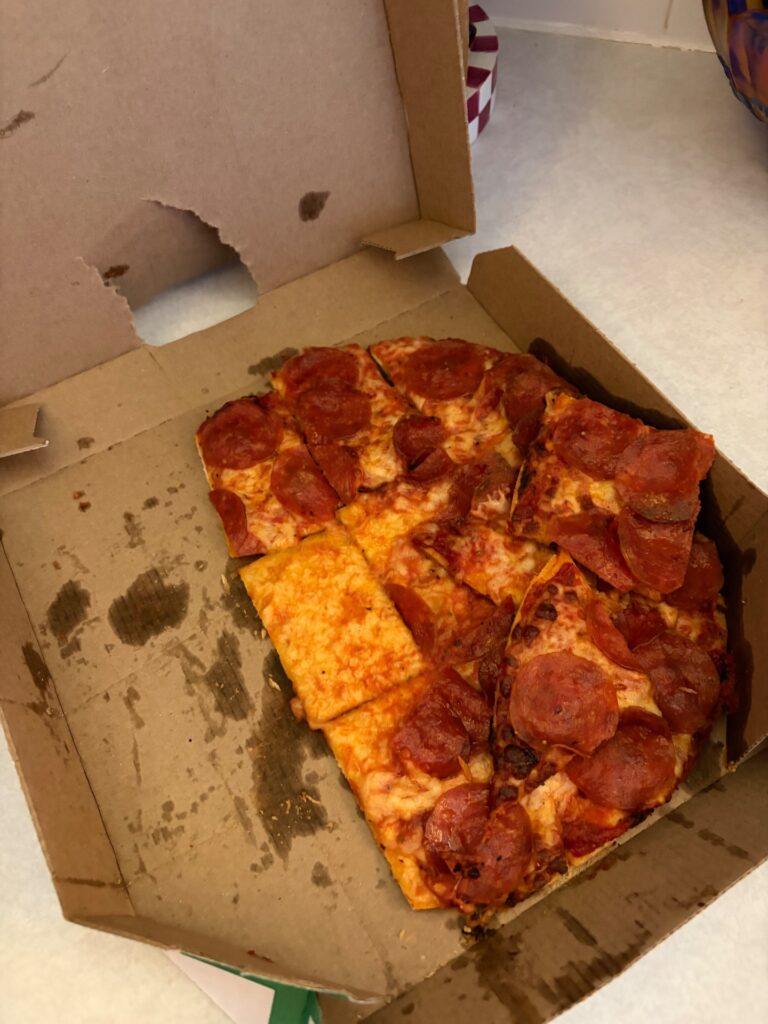
CustomerServiceNumbers.com currently has one published DoorDash review, with a 1.0 out of 5 rating. The August 2026 reviewer reported a damaged, partially missing pizza order, delivery instructions not being followed and a request for a refund. One review is not enough to establish a company-wide trend, but it shows why order photos, delivery instructions and the final refund outcome are useful details in a consumer review.
For a separate independent review page with a -5 to +5 rating scale, see DoorDash reviews and complaints on ZeroStars.org.
DoorDash Compared With Other Delivery Apps
Customers comparing DoorDash with other delivery platforms often evaluate restaurant and store selection, delivery range, fees, subscription value, order tracking, item accuracy, refund handling and support access. These CSN guides cover the closest alternatives:
- Uber Eats customer service
- Grubhub customer service
- Postmates customer service
- Instacart customer service
Frequently Asked Questions About DoorDash Customer Service
What is the DoorDash customer service phone number?
DoorDash customer support is 1-855-431-0459. DoorDash lists phone and chat support as available 24 hours a day, seven days a week.
What is the Dasher customer service number, and is it available 24/7?
Dashers can call 1-855-431-0459 or use chat through the Dasher app. DoorDash lists both channels as available 24/7. For an active delivery, start with its Help route.
How do I speak with DoorDash about a missing order?
Open the affected order in the DoorDash app, tap Help and choose Order never arrived. Follow the guided resolution or connect with an agent. You can also call 1-855-431-0459.
How do I get a refund from DoorDash?
Select the affected order, tap Help and choose the exact order problem. DoorDash may offer a refund, credit, redelivery or further review depending on the facts. Record whether an approved resolution is DoorDash credit or a refund to the original payment method.
How do I cancel DashPass?
Open the DoorDash account menu, go to Manage DashPass, select Cancel Membership and complete the prompts. Cancel at least one day before the next renewal and save the confirmation.
What is 1-855-973-1040 used for?
DoorDash currently publishes 1-855-973-1040 for DoorDash Crimson deposit-account and card support. The currently listed general consumer and Dasher support number is 1-855-431-0459.
What is the DoorDash merchant support number?
For a live U.S. merchant order issue, call 1-855-222-8111. For non-live account, menu, portal, payout or banking questions, use the Merchant Portal or Merchant Help Center.
What is the DoorDash for Business phone number?
Call 1-855-830-5429 or email business-support@doordash.com. DoorDash lists Business support from 5 a.m. to 9 p.m. Pacific time daily.
Is a 303 2nd Street charge from DoorDash?
It may be. DoorDash has used 303 2nd Street in San Francisco as its headquarters address, so a DoorDash, DashPass or Caviar transaction may show that location. Confirm the amount through order history, receipts and payment apps; an address match does not prove authorization.
Does DoorDash have a corporate phone number?
DoorDash’s SEC filing lists 1-650-487-3970 for its principal executive offices. Treat it as a corporate-office number, not a dedicated consumer refund or order-support line.
Is CustomerServiceNumbers.com affiliated with DoorDash?
No. CustomerServiceNumbers.com is an independent consumer information and review site and is not affiliated with DoorDash, Inc., DashPass, Caviar, any merchant or any Dasher.
Should I reset my password or reinstall the Dasher app during an outage?
No. DoorDash advises against both during an outage. Refresh and retry sign-in instead. See the outage section.
What should I do if my Dasher earnings are missing after an outage?
DoorDash says completed-order earnings should appear after resolution. If they remain wrong, give support the delivery details. Potential compensation or ratings information arrives by official email; payment is not guaranteed.
Official DoorDash Policy and Specialized Support Sources
The customer, Dasher and merchant Help Centers are linked in the contact table above. The outage instructions are linked in the outage section. Additional sources supporting the deadlines, policies and specialized contacts in this guide:
- DashPass cancellation instructions
- U.S. consumer terms for DashPass and refunds
- DoorDash Crimson support information
- DoorDash for Business support
- DoorDash safety information
Why Trust CustomerServiceNumbers.com?
CustomerServiceNumbers.com has published customer-service contact information and consumer review pages since 2004. The August 2026 review checked general customer, Dasher, merchant, Business, Crimson and safety routes against DoorDash help pages, and the corporate details against a DoorDash SEC filing. The October 7, 2026 update rechecked customer and Dasher 24/7 contacts, added official outage guidance and distinguished anonymous reports from confirmed incidents. Company policies and contact details can change, so account-specific decisions should always be confirmed in the official DoorDash app or Help Center.
Share Your DoorDash Customer Service Experience
Have you contacted DoorDash about a missing order, wrong delivery, refund, DashPass charge, account issue, Dasher problem, merchant concern or safety incident? Leave a review below and include the issue type, support route, approximate dates and whether the problem was resolved. Do not post your order number, home address, phone number, email address, payment details, password, PIN or one-time code.
Customer Service Numbers Disclaimer
CustomerServiceNumbers.com is not affiliated with DoorDash, Inc., DashPass, Caviar, DoorDash for Business, DoorDash Crimson, any restaurant or store, any Dasher, bank or card issuer. Contact information and links are provided for consumer convenience and may change. Refunds, credits, cancellations, account decisions and complaint outcomes depend on DoorDash’s current terms, the facts of the case and applicable law. Reader reviews reflect individual experiences and are not independently verified statements by DoorDash.